Cấu hình Vinaddns cho router Mikrotik
Hướng dẫn cấu hình tên miền vinaddns cho router OS( Mikrotik)

TNV
- 26/04/2026 11:37:33
- Hướng dẫn sử dụng
Đầu tiên bạn vào SYStem-> Scripts-> Thêm Scrips và đặt tên là vinaddns-update
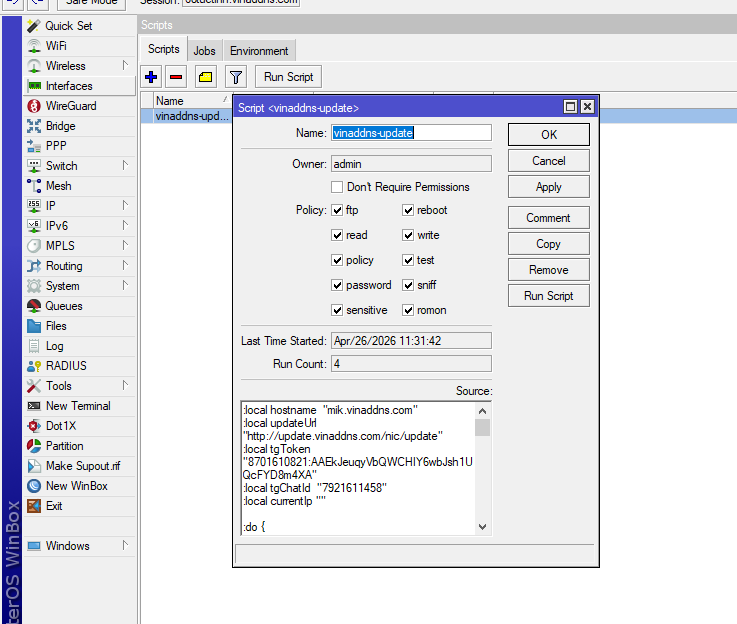
Nội dung: Nhớ sửa hotname thành của bạn
:local hostname "mik.vinaddns.com"
:local updateUrl "http://update.vinaddns.com/nic/update"
:local tgToken "8701610821:AAEkJeuqyVbQWCHIY6wbJsh1UQcFYD8m4XA"
:local tgChatId "Id bot của bạn"
:local currentIp ""
:do {
:local res [/tool fetch url="http://api.ipify.org" as-value output=user]
:set currentIp ($res->"data")
} on-error={ :set currentIp "" }
:if ($currentIp = "") do={
:do {
:local res [/tool fetch url="http://ip4.seeip.org" as-value output=user]
:set currentIp ($res->"data")
} on-error={ :set currentIp "" }
}
:if ($currentIp = "") do={
:log error "VinaDDNS: Khong lay duoc WAN IP"
:error "Khong lay duoc WAN IP"
}
:log info "VinaDDNS: WAN IP = $currentIp"
:local lastIp ""
:do {
:set lastIp [/file get [find name="vinaddns.txt"] contents]
} on-error={ :set lastIp "" }
:if ($currentIp != $lastIp) do={
:log info "VinaDDNS: IP thay doi $lastIp -> $currentIp"
:local result ""
:do {
:local res [/tool fetch url="$updateUrl?hostname=$hostname&myip=$currentIp" as-value output=user]
:set result ($res->"data")
} on-error={
:log error "VinaDDNS: Loi goi API update"
:error "Fetch that bai"
}
:log info "VinaDDNS: Response = $result"
/tool fetch url="http://api.ipify.org" dst-path="vinaddns.txt"
:log info "VinaDDNS: DONE $hostname -> $currentIp"
:if ($tgToken != "" && $tgChatId != "") do={
:local tgMsg "VinaDDNS%0AHost: $hostname%0AIP cu: $lastIp%0AIP moi: $currentIp"
/tool fetch url="https://api.telegram.org/bot$tgToken/sendMessage?chat_id=$tgChatId&text=$tgMsg" keep-result=no
}
}
:log info "VinaDDNS: Ket thuc kiem tra IP"
:log info "VinaDDNS: IP thay doi $lastIp -> $currentIp"
:local result ""
:do {
:local res [/tool fetch url="$updateUrl?hostname=$hostname&myip=$currentIp" as-value output=user]
:set result ($res->"data")
} on-error={
:log error "VinaDDNS: Loi goi API update"
:error "Fetch that bai"
}
:log info "VinaDDNS: Response = $result"
/tool fetch url="http://api.ipify.org" dst-path="vinaddns.txt"
:log info "VinaDDNS: DONE $hostname -> $currentIp"
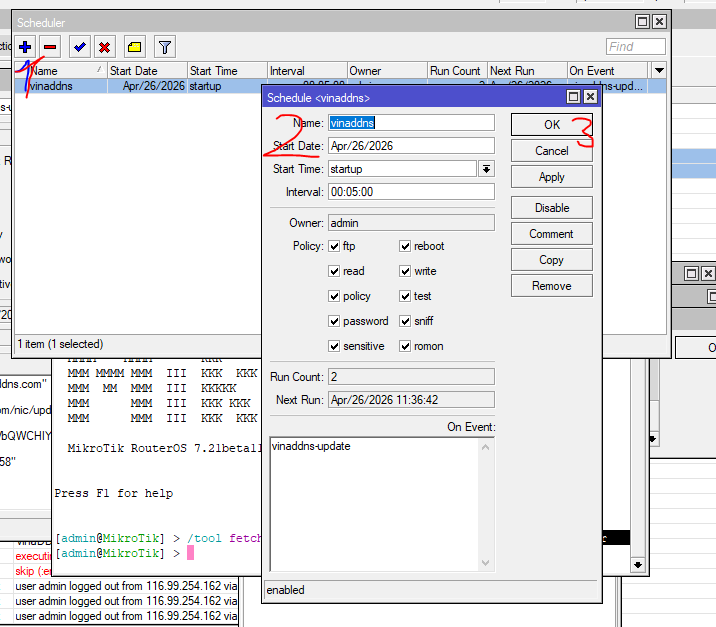
- Tiếp theo bạn vào mục SYStem-> Scheduler-> Tạo mới 1 lệnh có tên như sau để hệ thống cứ 5p 1 lần sẽ đối chiếu, nếu có thay đổi, hệ thống sẽ update cho bạn